Workflow & Automation


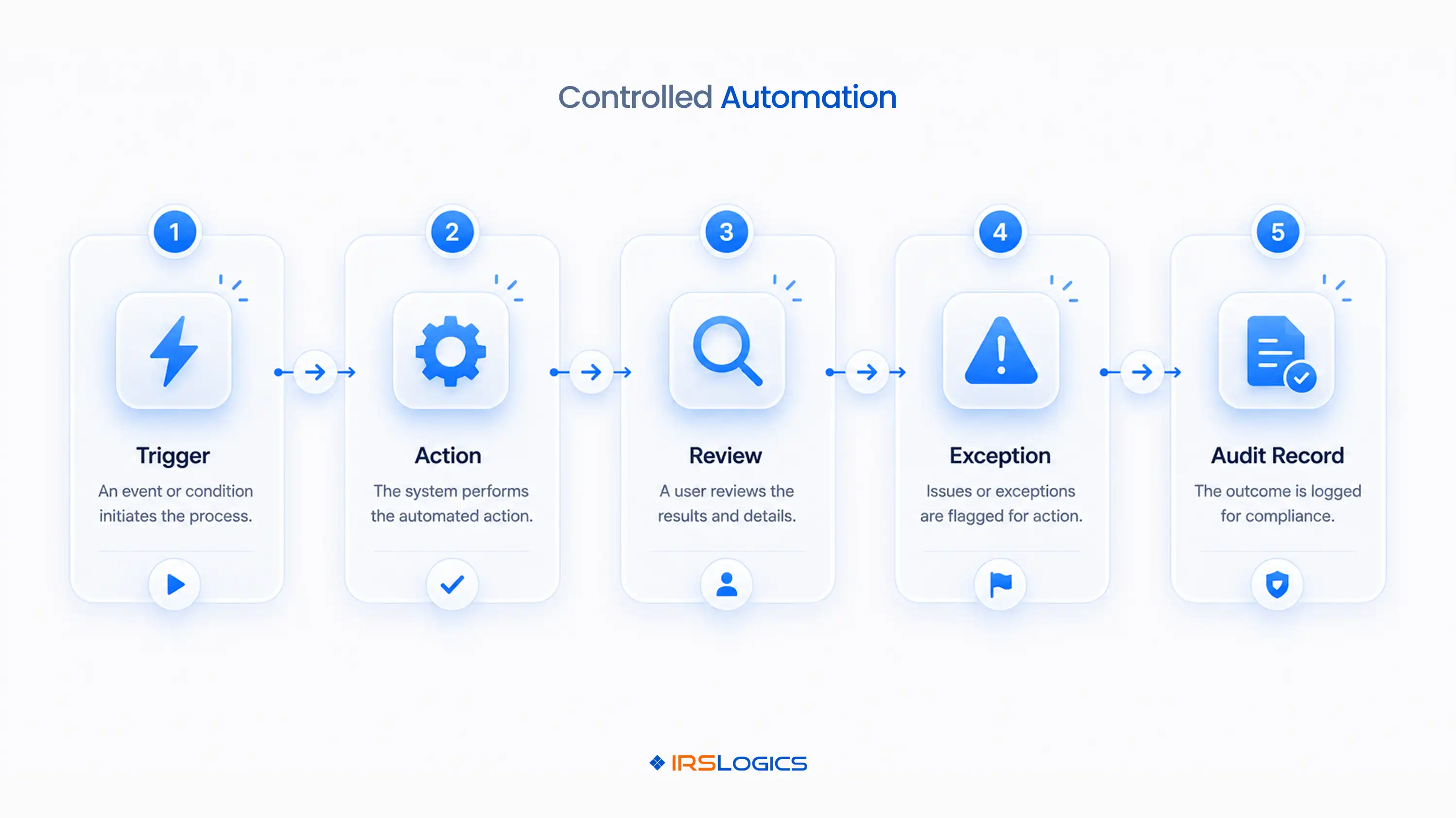
A resolution firm can automate reminders, document requests, routing, form population, transcript follow-ups, and status changes. It cannot automate professional authority, judgment, or accountability. Tax automation software works best when routine events move automatically and defined human checkpoints stop a case before an incorrect authorization, transcript interpretation, deadline, or resolution strategy moves forward. The useful question is not whether a workflow is automated. It is where the workflow must pause.
Tax automation software should handle repeatable actions whose inputs, owner, timing, and expected outcome are already defined. The safest automation target is administrative movement. Examples include creating a task when a case enters investigation, reminding a client about a missing document, routing a transcript for review, updating an internal status after approval, and notifying a manager when work becomes overdue.
That is different from automating a substantive tax decision. Software may collect financial data and populate fields, but a practitioner still determines whether the information is complete and which resolution route is appropriate. IRSLogics supports custom tax resolution workflows and automations across case management, documents, transcripts, forms, communication, and billing. The firm still decides which events can advance automatically and which require approval.
A human checkpoint belongs wherever an error could change authority, taxpayer rights, a filing position, or the case strategy. Risk, not convenience, should determine the approval gate. A reminder email may need only a template review. A transcript interpretation or Offer in Compromise recommendation needs an accountable practitioner.
Use three checkpoint levels. Low-risk actions can run automatically and remain visible in the activity history. Medium-risk actions can be prepared automatically but require a named reviewer before release. High-risk actions should remain blocked until the responsible practitioner records a decision and supporting note.
This model prevents a common failure in tax workflow automation: a status change appears complete even though the underlying work is not. Tie every approval to evidence. The reviewer should see the source notice, authorization, transcript, financial document, or draft form before choosing approve, return, or escalate.
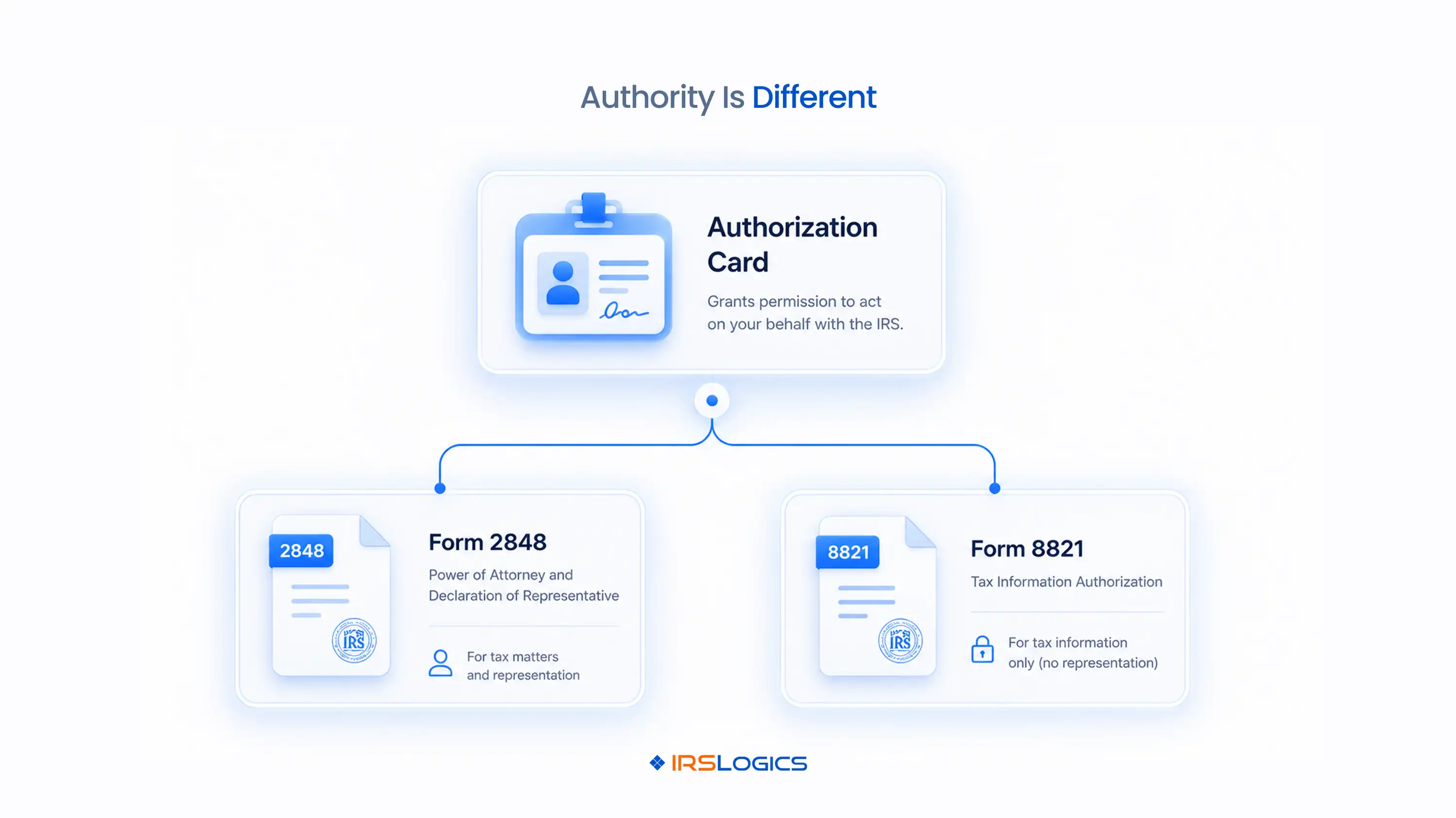
Authorization automation should validate the record and route it, not assume the form grants every permission. Form 2848 and Form 8821 are not interchangeable. Form 2848 appoints an eligible representative for specified matters, while Form 8821 authorizes access to tax information without appointing a representative to practice before the IRS.
The workflow should capture the taxpayer name and identifier, authorization type, representatives or appointees, tax forms, tax periods, signature status, submission method, and acceptance status. It should block transcript or representation tasks when required scope is missing.
The IRS permits eligible professionals to submit Forms 2848 and 8821 online, but submission is not the same as acceptance. Create separate statuses for prepared, signed, submitted, accepted, rejected, and superseded. That distinction makes the exception visible instead of allowing a rejected form to sit behind a generic “complete” label.
A failed transcript request should create a reason-specific exception rather than a generic retry task. The failure category determines the next action. The IRS Transcript Delivery System requires eligible access and an appropriate authorization on file for the taxpayer and periods requested.
Common exception categories include authorization not found, period outside scope, identity mismatch, unavailable transcript product, no record of return, and temporary service failure. Each category needs an owner and response rule. An authorization problem goes back to the authorization queue. An unavailable product may require another transcript type. A temporary failure can be retried under a controlled schedule.
Do not allow unlimited silent retries. After a defined number of attempts, route the case to a person with the request history attached. IRSLogics’ transcript and case-management workflow can keep the request, result, assignment, and next step connected to the client matter.
Transcript data should create proposed tasks only after a reviewer confirms what the record means. Receipt and interpretation are separate workflow events. A successful download proves that a file arrived. It does not prove that every required period is present or that the case strategy should change.
Build a review checklist around the requested tax forms and periods, filing status, assessed balances, collection activity, wage and income records, missing returns, and material differences from client intake. The reviewer should mark each transcript set accepted, incomplete, or escalated.
Once accepted, rules can create downstream work. A missing return indicator may create a filing-history task. A new assessment may create a notice or balance review. A changed account record may trigger monitoring. This sequence keeps automation useful without turning raw transcript data into an unreviewed conclusion. For deeper selection criteria, link the workflow to the firm’s tax transcript software evaluation process.
Forms and financial workflows can be prepared automatically, but the underlying facts still need verification. Automation may transfer approved data into a working form. It should not convert unanswered questions, stale balances, or unsupported expenses into final submissions.
A controlled sequence starts with a structured questionnaire, required-document list, completeness review, and client clarification. Only approved values should bind into financial forms. Changes after approval should reopen the affected review rather than silently overwrite the earlier record.
IRSLogics describes a digital financial questionnaire and form-binding workflow that can reduce re-entry. The control point is the approval step. Record who approved the data, when it was approved, which documents supported it, and whether later changes affected the analysis. The same rule applies to auto-filled letters and federal or state forms.
Notice automation should create visibility immediately while keeping date verification with a responsible person. A scanned or uploaded notice can start the workflow, but it should not establish an unquestioned deadline. Notice type, issue date, taxpayer, periods, response instructions, and received date all affect what happens next.
Create an urgent review task when a notice enters the system. The reviewer confirms the document, records the applicable response date, assigns the work, and identifies any dependency such as authorization or missing records. A second control should alert a manager when the deadline changes, the assigned user becomes unavailable, or the task remains incomplete inside the firm’s escalation window.
This is where general task automation often fails. It creates reminders without preserving why the date exists. A resolution workflow should link the task back to the source notice and the reviewer’s verification note.
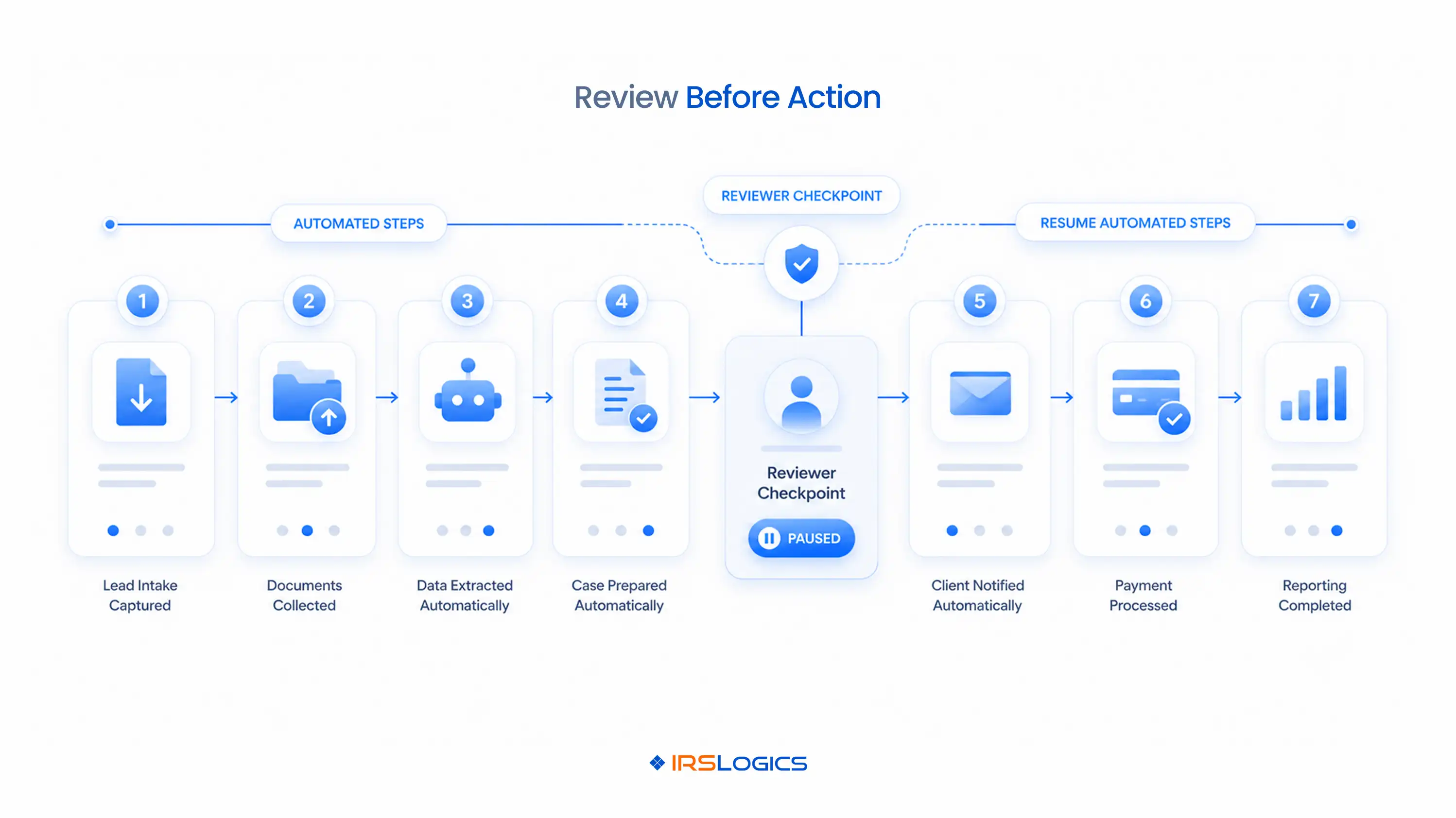
Every meaningful automation should preserve the trigger, action, actor, timestamp, and exception history. An audit trail must explain why the system moved the case. A status label alone is not enough when a firm needs to reconstruct what happened.
Record the rule version, source event, previous state, new state, messages sent, documents created, reviewer decision, override reason, and resulting assignments. Access changes and exports also belong in the history. The IRS tells tax professionals to maintain a written information security plan and points firms to Publication 4557 for safeguards covering taxpayer data.
Managers should review failed automations and overrides as operational signals. Repeated exceptions may show that a rule is too broad, an intake field is unclear, or staff training needs attention.
Test the workflow with normal and failed cases before allowing it to control live work. A useful test proves the exception path, not only the happy path. Use de-identified or synthetic records and document the expected result for each scenario.
After the pilot, compare required configuration, user training, exception volume, and manager review time. Firms ready to test these controls can book an IRSLogics workflow demo using one representative case pattern.
Tax automation software moves repeatable tax work through defined triggers, tasks, documents, messages, approvals, and status changes. Its value depends on how well the workflow separates automatic administration from professional decisions.
No. Tax automation software can prepare, route, and document work, but an eligible professional remains responsible for authority, interpretation, strategy, and representations made to the IRS.
Software can support transcript retrieval workflows when the user is eligible and an appropriate authorization is on file. The firm should still verify authorization scope, requested products, receipt completeness, and practitioner review.
No. They can share intake and submission steps, but the workflow must preserve the different authority each form grants and the exact matters and periods covered.
Reminders, task creation, document requests, routing, overdue alerts, and approved template messages are usually safer starting points. Begin with actions that are reversible and easy to audit.
A human-in-the-loop workflow pauses an automated sequence at a defined risk point so an authorized person can approve, return, or escalate the work.
Review them after process changes, software releases, regulatory updates, recurring exceptions, or role changes. A scheduled quarterly review also helps firms find stale rules before they affect many cases.
It should include the trigger, source record, rule version, action, timestamp, user or system actor, approval, override reason, messages, and resulting assignments.
Start with one case stage and classify every action as automatic, approval-required, or practitioner-only. Then define what evidence the reviewer sees, what blocks the workflow, and where an exception goes. Test failed authorizations, incomplete transcripts, changed deadlines, and staff departures before expanding the rules.
The right tax automation software will make routine work faster while making risky decisions more visible. Use a representative case to evaluate whether IRSLogics can support your required checkpoints, audit history, and exception routes before configuring the full firm.
All
Tax Software
Workflow & Automation
Industry News
Resolution Tips
Tax Resolution Marketing

Lorem ipsum dolor sit amet, consectetur adipiscing elit. Suspendisse varius enim in eros elementum tristique. Duis cursus, mi quis viverra ornare, eros dolor interdum nulla, ut commodo diam libero vitae erat. Aenean faucibus nibh et justo cursus id rutrum lorem imperdiet. Nunc ut sem vitae risus tristique posuere.


Share this article directly by email. Simply enter the recipient’s details below.

Article has been send to you.

.webp)