Workflow & Automation


You took on three new IRS resolution cases this week.
One client is in the middle of an Offer in Compromise. Another just got a collection notice and needs transcripts pulled. The third is somewhere in document purgatory, because they swore they emailed you their W-2s but there is no trace of them anywhere.
It is 6:47 PM. You still have invoices to send, tasks to follow up on, and a case status update your case manager is waiting for. Your inbox has 34 unread emails. Two of them are from the same client asking where things stand.
This is not a bad day. This is just Tuesday.
And the worst part? None of this is because you are bad at your job. You are actually excellent at it. The IRS resolution work, the negotiations, the strategy- that part you have down. The chaos lives in the everything else. The coordination. The follow-up. The documents. The tracking. The billing. The "who is supposed to do what and when."
That is a workflow problem. And it is one that most accounting practices never fully solve, until they do, and then they cannot imagine going back.
At its simplest, accounting workflow is the sequence of steps a case moves through from the moment a lead comes in to the moment the resolution is complete, and the invoice is paid.
For a general accounting firm, that might be manageable with a spreadsheet and a prayer. But tax resolution practices are a different beast entirely. IRS cases are not linear. They stall, escalate, require third-party data, and demand rapid response when the agency moves. A workflow management system built for general accountants will buckle under that kind of pressure.
According to the IRS itself, the IRS has multiple collection pathways, each with its own timeline, forms, and requirements. Keeping up with those moving parts while also running a firm is where things start to break.
Here is what falls apart most often:
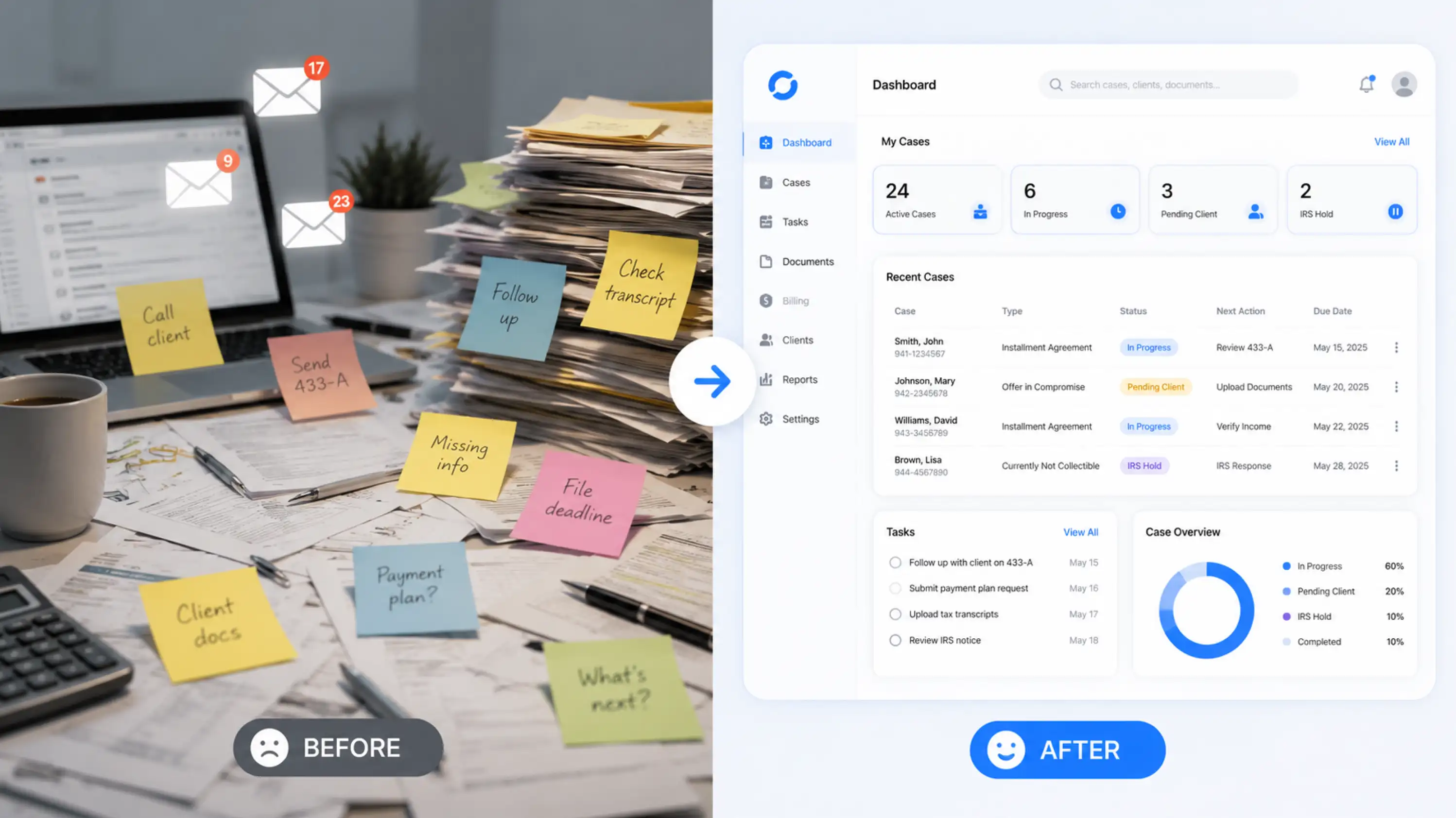
Documents go missing or never get collected in the first place. Someone emails a client for the third time asking for the same bank statement. The client stops responding because they feel like nothing is moving.
Tasks slip between team members. A case manager thought the EA was following up. The EA thought the case manager was. The IRS deadline was last Thursday.
Billing gets messy. An invoice goes out late, or to the wrong stage of the case, or without the right line items. Now you are chasing payments instead of focusing on resolution.
Communication is scattered. Texts here, emails there, calls logged nowhere. When a client asks, "What is the update on my case?" nobody can answer quickly.
These are not people problems. They are system problems.
Not all workflow management software for accountants is built the same. If you are evaluating options or trying to understand what you actually need, here is the list that matters.
1. Move cases through defined stages automatically
Every IRS resolution case has stages. Lead comes in. Intake happens. Documents are collected. Financials are reviewed. The resolution strategy is determined. Forms are filed. Negotiations happen. Resolution lands.
If your team has to manually decide what happens next after every step, you lose time and miss things. The best accounting workflow systems let you build custom case statuses and move cases through them with built-in task triggers.
2. Collect documents without chasing people
This one deserves its own section, honestly, but in short: if your document collection process relies on email, you are losing hours every week. A dedicated document collection workflow, where clients receive a link, upload directly, and you get notified when it is done, is not a luxury. It is the baseline.
3. Keep all client communication in one place
Phone calls. Texts. Emails. Notes from a call last Tuesday. If any of that lives in a different tool than your case file, you are working with incomplete information every single time. Workflow management for accountants handling IRS cases means your entire communication history stays with the case, not in someone's personal inbox.
4. Automate billing to match case milestones
Tax resolution cases often have staged billing. Initial fee. Ongoing fees. Success fees. If someone has to manually create and send every invoice, mistakes happen, and payments get delayed. Good workflow management software for accountants ties billing to case progress, so nothing falls through the cracks.
5. Give you visibility without micromanaging
You should be able to look at a dashboard and know exactly which cases are stalled, which tasks are overdue, and which team members are underwater, without scheduling a meeting to find out. That kind of visibility is what separates firms that scale from firms that plateau.
Picture the same Tuesday as before. Three active cases. A new lead just came in.
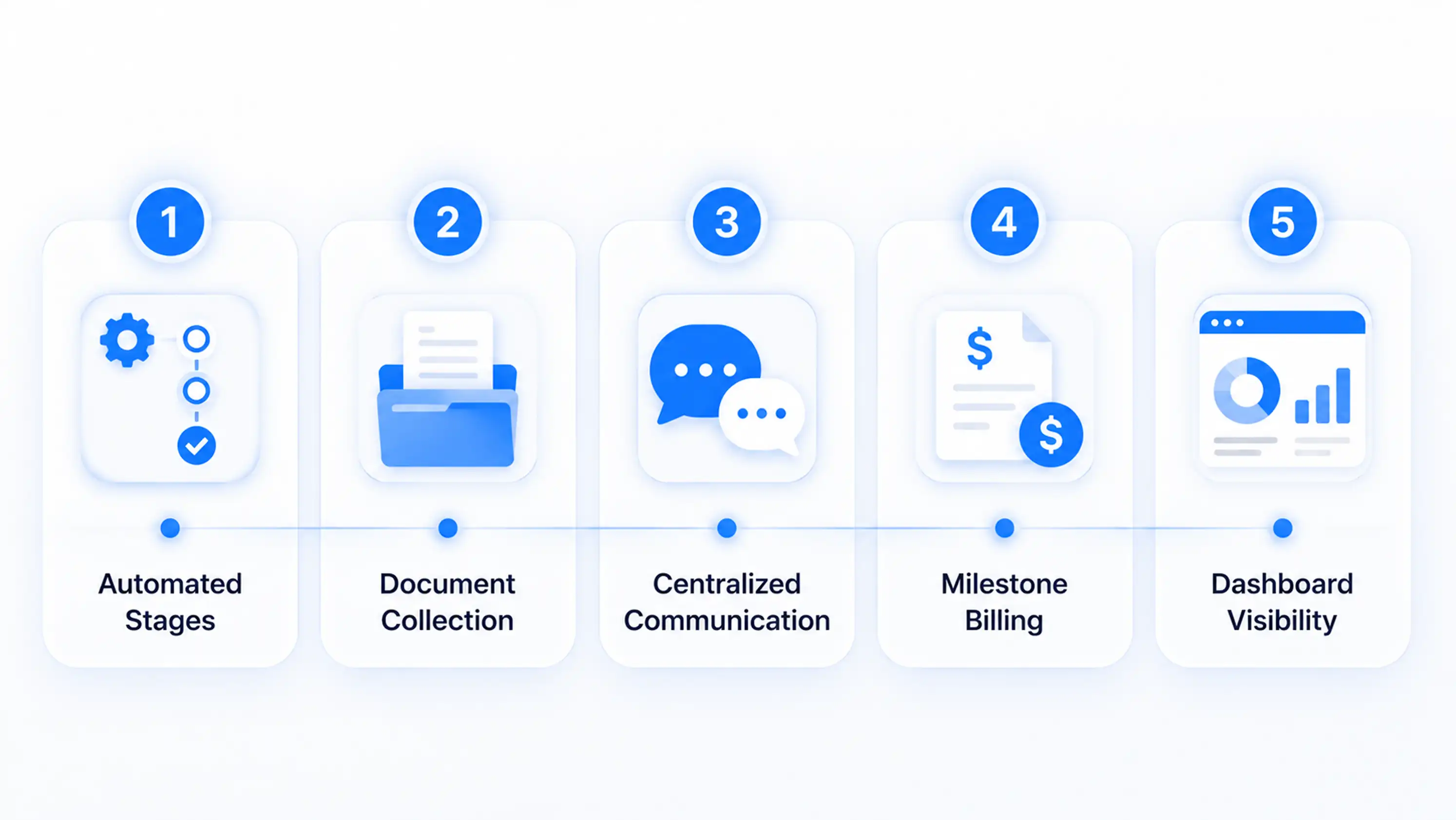
But this time, the new lead fills out your intake form and is automatically assigned to a case manager. The document collection workflow kicks off without anyone sending a manual email. The client gets a secure link and uploads directly. You get notified.
The Offer in Compromise case? You can see exactly where it is in the pipeline. The next task is assigned. The case manager knows what to do.
The client who got the collection notice? You pulled their IRS transcripts directly from your case management system. You have everything you need to respond.
The billing? It went out automatically when the case hit the next milestone. Payment is processing.
You leave at 5:30 PM. Not because you worked less, but because the system worked harder.
That is what proper workflow management for tax resolution firms actually looks like.
Here is something the general workflow management conversation misses entirely when it comes to tax resolution: forms.
IRS cases require specific federal and state forms. Form 433-A. Form 433-B. Form 656. Penalty abatement requests. Installment agreement applications. Each of these needs accurate financial data from the client.
The traditional workflow looks like this. You send the client a financial questionnaire by email. They fill it out, sometimes incorrectly, and send it back. You re-enter the data manually into the IRS form. You catch an error. You go back to the client. This loop can take days.
The modern version looks like this. You send the client a digital financial questionnaire through your case management system. They fill it out. You approve it. The data auto-populates directly into the IRS financial forms inside the same system.
According to the NATP (National Association of Tax Professionals), reducing manual data entry is one of the highest-leverage changes a tax professional can make to their practice efficiency. It is not just about speed. It is about accuracy. And in IRS resolution, accuracy is everything.
This kind of integration between financial intake and form generation is not something general accounting workflow tools offer. It requires software built specifically for tax resolution.
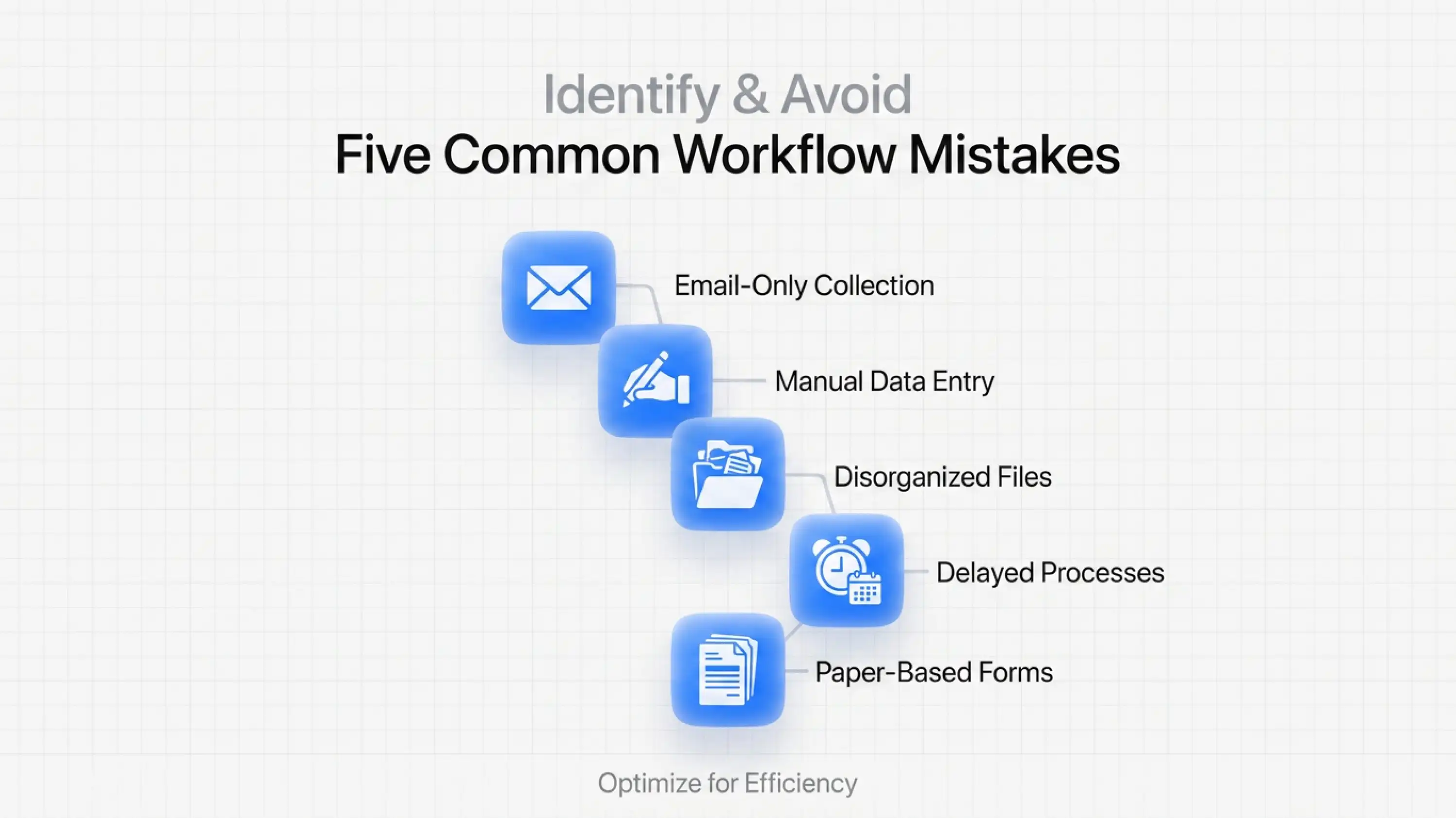
Before we get to solutions, let us name the things that quietly bleed firms dry.
Relying on email for document collection. Email is not a workflow. It is a communication tool. When your document collection strategy is "we email the client and hope," you are one missed inbox away from a missed deadline.
No task ownership. If a task is assigned to "the team," it is assigned to no one. Every action in a case needs a name and a due date.
Disconnected billing. Billing that lives in a separate tool from your case management creates a gap where invoices get missed, delayed, or sent incorrectly. Learn more about tying payments to invoices cleanly to see what that gap actually costs.
No CRM for tax resolution. A tax resolution CRM is not the same as a general CRM. If you are using HubSpot or Salesforce to track IRS resolution cases, you are probably building workarounds that take more time than they save.
Manual appointment management. Scheduling calls with the IRS or with clients through back-and-forth emails is a workflow killer. Calendar integrations that sync directly with your case files and automatically appear in Google Calendar are a small change with an outsized effect.
If you are a CPA, enrolled agent, or tax attorney handling IRS resolution cases, general workflow software will always feel slightly wrong. Because it is. It was not built for you.
IRS Logics was. It is the only all-in-one platform purpose-built for tax resolution professionals, combining case management, CRM, billing, IRS forms, e-signatures, and a client portal into a single system. No switching between tools. No exporting and importing. No "this does not quite fit our workflow" conversations.
The Document Collection Tab lets you set up a structured, automated document intake process so clients can upload once and you get notified instantly. The Financial Questionnaire feature lets clients fill out their financial information digitally, and that data auto-populates directly into IRS financial forms inside Logics, cutting hours of manual re-entry. The SMS conversation view keeps every text exchange with a client in the case file, so nothing gets lost in someone's personal phone. And tying payments to invoices means your billing is always clean, trackable, and accurate.
For firms managing multiple cases across a team, IRS Logics also provides role-based access, custom case statuses, task assignment, and activity tracking, so you can see exactly what is happening on every case without chasing your team for updates. And with Google Calendar integration, every appointment booked through Logics automatically appears in your Google Calendar.
This is what it looks like when workflow management software is built for the problem you actually have.
Accounting workflow is the process a case follows from intake to resolution. In tax resolution, a structured workflow reduces errors, speeds up cases, and helps firms handle more clients without adding staff.
General workflow tools were not built for IRS resolution. The best platforms combine case management, IRS forms, document collection, billing, CRM, and client communication in one system. IRS Logics is designed specifically for this workflow.
The typical workflow includes lead intake, document collection, case analysis, IRS negotiations, and final resolution with billing. Each stage needs clear ownership and tracking.
Many CPAs use tools like Karbon, TaxDome, or Canopy. However, tax resolution firms usually need specialized software with built-in IRS forms, transcript retrieval, and resolution-specific workflows.
When calls, emails, texts, and case notes live in one place, teams stay aligned and clients receive more consistent updates. The result is a smoother client experience and a more organized practice.
IRS resolution is hard enough without your workflow fighting you at every step.
The firms that grow without burning out are not the ones with the most talented people. They are the ones with the best systems. Systems where documents get collected without chasing. Where tasks do not slip. Where billing is automatic. Where a single dashboard tells you exactly what is happening across every case.
You do not need to work more hours. You need your hours to actually work.
All
Tax Software
Workflow & Automation
Industry News
Resolution Tips
Tax Resolution Marketing

Lorem ipsum dolor sit amet, consectetur adipiscing elit. Suspendisse varius enim in eros elementum tristique. Duis cursus, mi quis viverra ornare, eros dolor interdum nulla, ut commodo diam libero vitae erat. Aenean faucibus nibh et justo cursus id rutrum lorem imperdiet. Nunc ut sem vitae risus tristique posuere.


Share this article directly by email. Simply enter the recipient’s details below.

Article has been send to you.